Tennis Padel Score
NewTennis clubs and tournaments among friends

● The match doesn't end at the courtside

TennisScore Play here.
Follow it anywhere.
The scorekeeper for tennis, padel and pickleball, on your phone and on your wrist

TennisScore connects whoever is on the court with whoever wants to follow the match. The score is updated from the phone, from a Wear OS watch or by someone keeping score at the courtside, and it shows in real time even from afar. Followers watch live or switch on the alerts: a notification at every game, with no need to keep the app open.

TennisPadelSmartwatchLive matchesGame alertsMemory photos

Made for players, families and friends.

Free, no adsNo sign-upWorks offlineEnglish, Italian, Spanish, French, German

The core idea: a match is updated on the court and experienced in real time by those who can't be there.

On courtUpdate the score while you play
At the courtsideSomeone else can keep score
From afarFollowers watch live or get an alert at every game
On more devicesPhone, Wear OS watch and, in the works, external controls
Tennis player on court, waiting for the return Tennis · Live
Match in progressSet 2 · 01:18
Marco40
Luca30
TennisScore on a Wear OS watch: score, sets and games, heart rate
Padel player hitting the ball on an indoor court
PadelThe same experience, another court.
Register your tennis club

NewTennis clubs and tournaments

Your tennis club and its tournaments, online and free

Register the club and run its tournaments without spreadsheets or group chats: members enter from a link, the platform makes the draw and the schedule, and the players confirm the results.

  • Sign-ups by link and QR codeno account for players
  • Draw and scheduleknockout draws, groups, teams
  • Results from the playersconfirmed by the opponent
  • From the app toomatch and result with one tap

No club? Create a tournament among friends →

Tournaments

On court this week

Results, order of play and draws of the tournaments under way and coming up, updated several times a day.

Full tournament calendar

Real situations

You don't need to see yourself in an avatar. You need to see yourself in the situation.

Playing, following from afar, having fun with friends: the page tells situations, not a single kind of person.

following live
Anna40
Laura30
Set 2 · updated now
From afar

The match comes to you.

A friend or a relative follows the score without being at the courtside: the match code is all they need. And if they can't keep watching, an alert at every game keeps them posted.

Four friends shake hands at the net after a padel match
Friends

A match is also a moment to share.

Play, close the match, keep the result and add the end-of-match photo.

Wear OS watch history: the score a few points ago
On court

A tap on the wrist, the phone in your pocket.

With a Wear OS watch you score the point without stopping the game: sets and games always in view.

An ecosystem, not just an app

The score is born on the court and reaches anyone who wants to follow it.

TennisScore connects match, players and spectators in different ways, without forcing everyone to use the same device.

Update the way you prefer

The score doesn't depend on a single way of entering it.

The player scores it, from the phone or from the wrist, or someone at the courtside does. We are also designing the link with dedicated physical controls.

SmartphoneSmartwatchCourtside scorekeeperDedicated remotein the worksGeneric interfacein the works
01 · Play

Tennis, padel or pickleball

One app for matches among friends, practice and challenges.

02 · Update

Choose who keeps score

Player, umpire, companion or whoever holds the phone.

03 · Follow

Follow a match

Friends and relatives follow how it goes even when they're far away.

04 · Remember

Result, photos and history

At the end you keep the result and add a photo of the moment.

One product, three perspectives

The role changes. The simplicity doesn't.

Look at the same match from the point of view of who plays, who keeps score and who follows from afar.

Player

The score should help you, not distract you.

Phone, Wear OS watch and, in the future, dedicated controls: the result is updated quickly and naturally during play.

Big buttonsA few taps, readable at a glance even in the sun.
SmartwatchThe score is kept straight from the wrist.
Tennis + padelThe same experience for both sports.
End of matchResult, photos and history in the same flow.

Courtside scorekeeper

Someone off the court can take care of the result.

Umpire, companion or friend: whoever holds the phone updates the match and leaves the players free to focus on it.

Live updateThe result reaches whoever follows with the code.
Separate roleWhoever keeps score doesn't have to be a player.
Voice announcementsThe score read aloud, umpire style.
External controlsIn the works: dedicated remote and connected buttons.

Remote spectator

Being far away doesn't mean missing the match.

With the match code, friends and family follow it live or get an alert at every game: they know what's happening without being there and without staring at the screen.

Sign-up with the codeFollow the matches you care about, even before they start.
Live updatesSee the result as it changes.
Alerts at every gameTurn on the bell and put the phone away: the app can stay closed.
Friends and familyA bridge between the court and those far away.

Tennis + Padel + Pickleball

Three sports. One scorekeeper.

Tennis and padel are scored the same way: 15, 30, 40, game, set and tie-break. Pickleball has its own scoring, with three numbers and the side out. Same app, same live score, same stats.

Tennis: player in action on an indoor court
Live score
Marco40
Luca30

● Tennis live

Tennis

From singles to doubles: a score that's readable, updatable and visible from afar.

Padel: four players ready to step on the court
Live score
Pair A6
Pair B5

● Padel live

Padel

Friends and pairs: the same app follows the rhythm of the match, with the golden point at deuce if you want it.

The scoreboard app for padel →
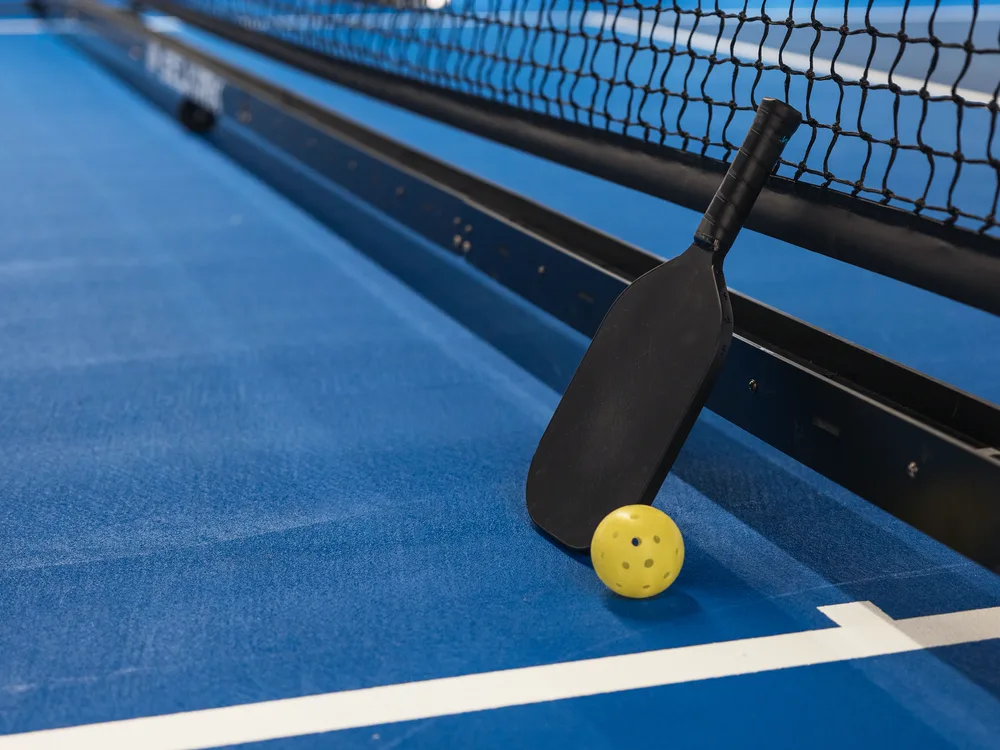
Pickleball: a paddle resting against the net with the perforated ball, on a blue court
Live score
Marco / Paolo7
Luca / Andrea4

● Pickleball live

Pickleball

Three-number call, side out and games to 11: the app keeps count, from the phone or the wrist, and calls it out loud.

The scoreboard app for pickleball →

Much more than a scorekeeper

Play, follow and share every tennis, padel or pickleball match.

Big buttons, readable in the sun, and the rules of tennis already inside.

Point by point

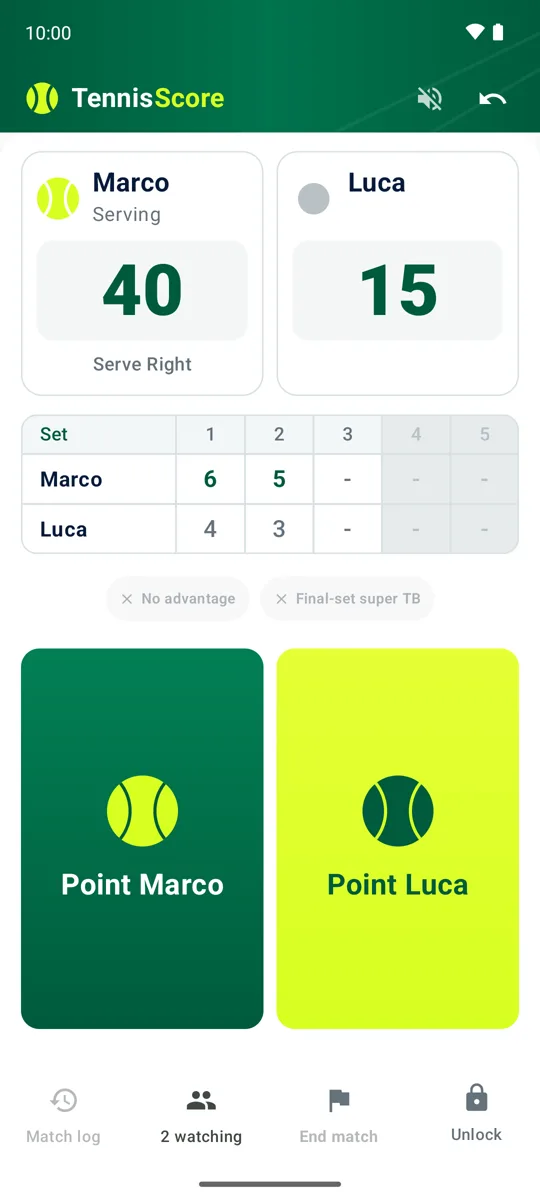
  • 15, 30, 40, advantage and tie-breaks
  • Best of 3 or 5 sets, custom games per set
  • No-advantage mode and 10-point super tie-break
  • Server and serving side always shown, singles and doubles

No mistakes on court

  • Voice announcements of the score, umpire style
  • Undo the last point
  • Screen lock against accidental taps
  • From the lock, edit venue, code and reminders of the match in progress

Livescore for spectators

  • Every match has a code: anyone who receives it follows the score live
  • With the bell on, an alert at every game and at the end of the match: the app can stay closed
  • Subscribing works even before the match starts

History and statistics

  • All your matches: upcoming, in progress, followed, completed
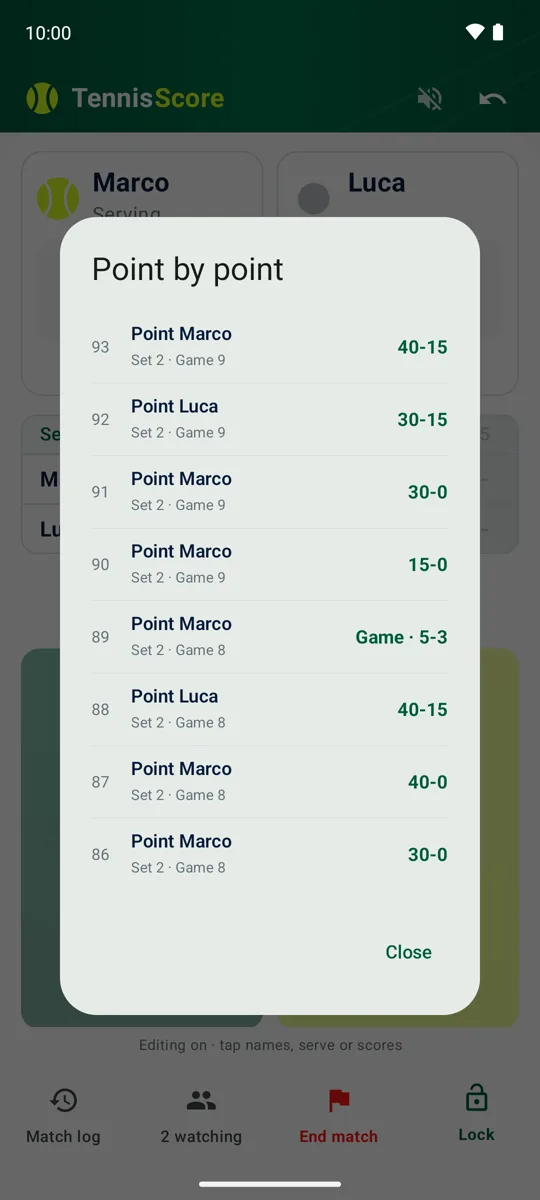
  • Basic and advanced stats, point-by-point log
  • Share the whole match as images or PDF

Wear OS watch

  • Score points from your wrist
  • Heart rate and steps of the match in your statistics
  • Works with the phone in your pocket

Players, photos and direct transfer

  • Your players, remembered: pick them from the list, each with a photo
  • Up to three memory photos per completed match, also in the shared pages
  • Hand a match, photos included, to a partner's phone nearby
  • Players and photos stay on your phone, never in the cloud

Tennis clubs and club tournaments

  • Your club with its page: logo, address on the map, courts and facilities
  • Club tournaments with registrations from a link or a QR code: players need no account
  • Draw, schedule, results confirmed by the players, draw sheet and standings
  • Alerts by email or on the phone, and results from the app too

See tournaments for tennis clubs

Tournaments among friends

  • A tournament without a club: the group name, the format, the link to send
  • Round robin or knockout draw ready to go, or every club format
  • Friends enter and confirm results from their phones, with the app too
  • Private: it opens only with the link

How it works

Wear OS

Tennis on your Wear OS watch: score from your wrist

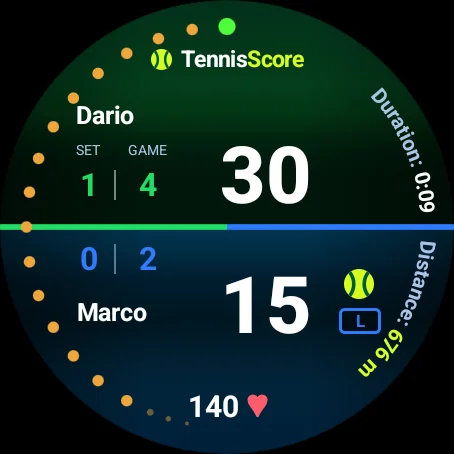
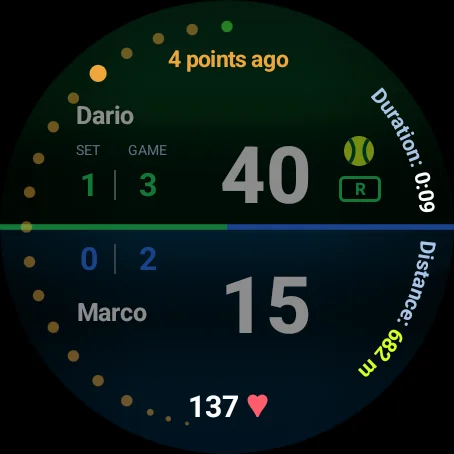
With TennisScore on your Wear OS watch, a tap on the wrist scores the point: one half of the screen for each player, sets and games always in view, the last points in a ring you can scroll back with the crown. The phone can stay in your pocket.

  • Heart rate and steps recorded during the match, if you turn the sensors on
  • Movement and cardio of the match in the detail: average heart rate, heart rate on key points, recovery between points, steps and estimated distance
  • Records between your matches

Sensor data stays on your devices and is never sent anywhere. It is sport information, not medical advice.

All about the smartwatch app →
Wear OS watch scoreboard with heart rate and estimated distance Wear OS watch history: the score a few points ago

Livescore

Tennis and padel live score: watch it live, or get an alert at every game

Every match gets a code. Family on the other side of the world, friends who could not come: with the code they follow the match on their own phone, and they choose how.

Live on the scoreboard

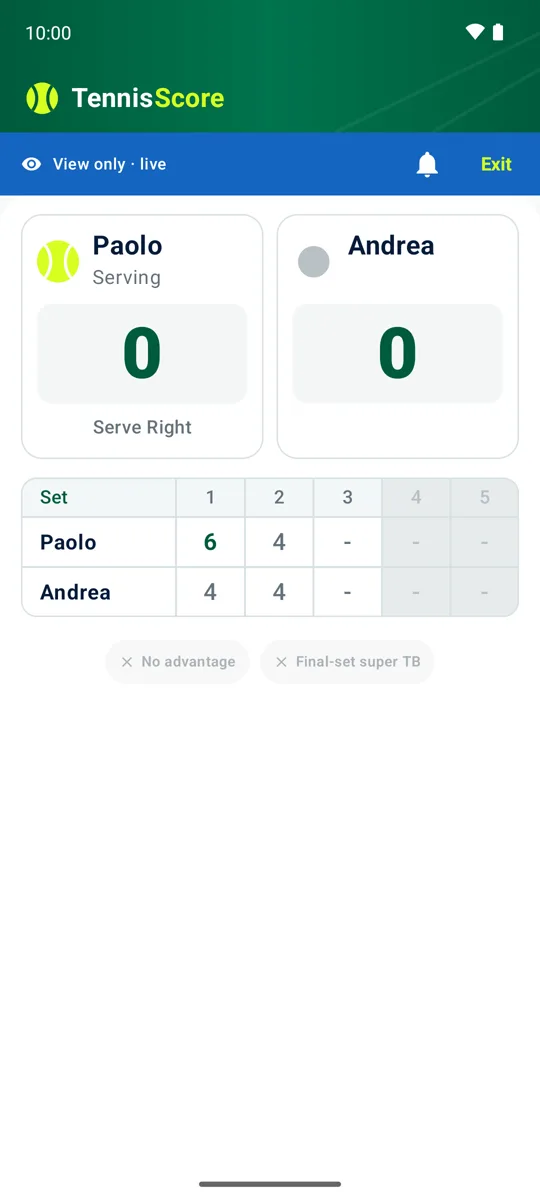
Open the match and see every point as it is scored: sets, games, points and who is serving, as if you were at the courtside.

With alerts, phone in your pocket

Tap the bell and close the app if you like: you get a notification at the end of every game and, when the match ends, the winner with the result. You don't have to keep watching.

  • One alert per game, never one per point: names, sets and games
  • Follow even before the match starts; turn the bell on and off whenever you like
  • The umpire's phone works offline: syncing resumes as soon as the network is back
Tennis live score as seen by a spectator on their phone
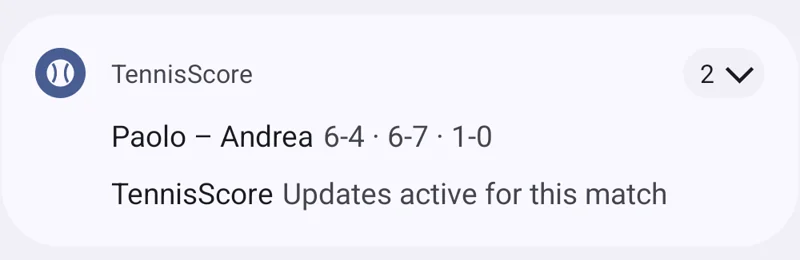
The TennisScore notification at the end of a game: the players' names and the updated score
The real notification at the end of a game: names and score.
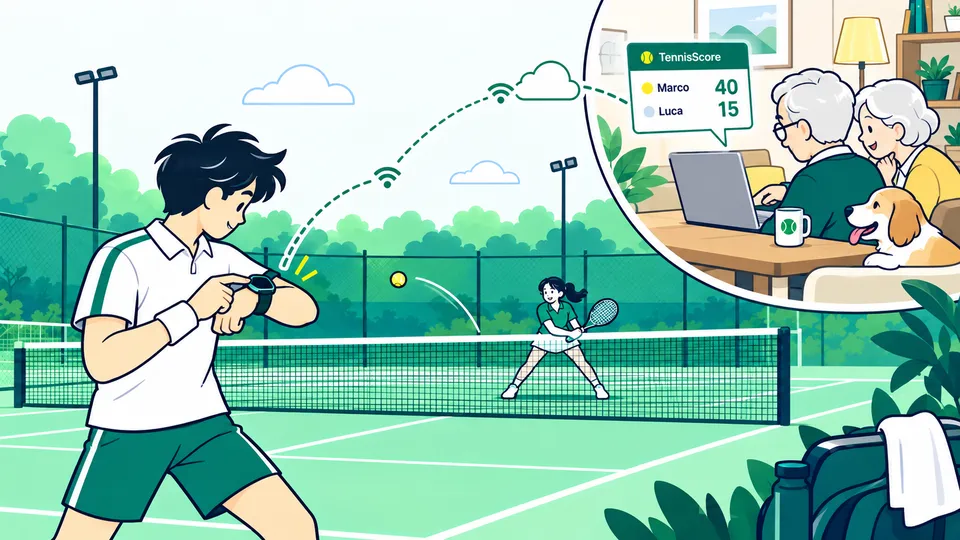
Illustration: a player scores the point from his watch while, at home, his grandparents follow the match live on a laptop
You score from your wrist, with your phone in your bag; your grandparents open the link you sent from the app and follow every point from home.

Reminders

Remind me: the start of a tournament or a match

In the tournament calendar and on the draw pages, the bell puts a reminder in your phone's calendar. No account and no sign-up: your browser prepares the reminder and it stays on your device. To follow a player, though, you need the TennisScore app.

A tournament

Only the start: a reminder the evening before the first day, at 7 pm.

The bell next to the tournament name, in the calendar and on its page

A match

The start of the match: a reminder one hour before the scheduled time.

The bell next to every scheduled match

A player

In a tournament, pick a player: a reminder before each of their matches, as long as they stay in the draw.

The bell next to their name, on the tournament page: only with the TennisScore app, how it works below

Only in the TennisScore app

You can follow a player only from the app

On the site, with your phone's calendar, you can remember a tournament or a match. Not a player: their next match is only known round after round, and an event saved in a calendar doesn't change by itself. That's why the player search is only in the TennisScore app, from version 1.3.

  1. On the tournament page, tap the bell next to the player (or the tournament bell, then choose “Phone”): on a computer the QR code appears, to scan with the app; on an Android phone the tournament opens in the app.
  2. In the app, confirm with “Remind me”: the tournament goes into “Tournaments you follow”, on the Matches page.
  3. With the player’s bell the app has already chosen them; otherwise tap “Choose a player” and type the name: the list only shows who is still in the draw.
  4. The app reminds you the evening before and one hour before each of their matches, even with the app closed. When the player is out of the tournament, the reminders stop by themselves.

Times change? The app moves its reminders by itself.

Several times a day, and again shortly before each reminder, the app reads the order of play from our site: a new time, a match moved to another day, the next opponent as soon as it's known. You don't have to do anything again. It isn't live: our site updates the order of play several times a day, so a last-minute change can arrive late. Reminders saved in your calendar, on the other hand, stay as you saved them.

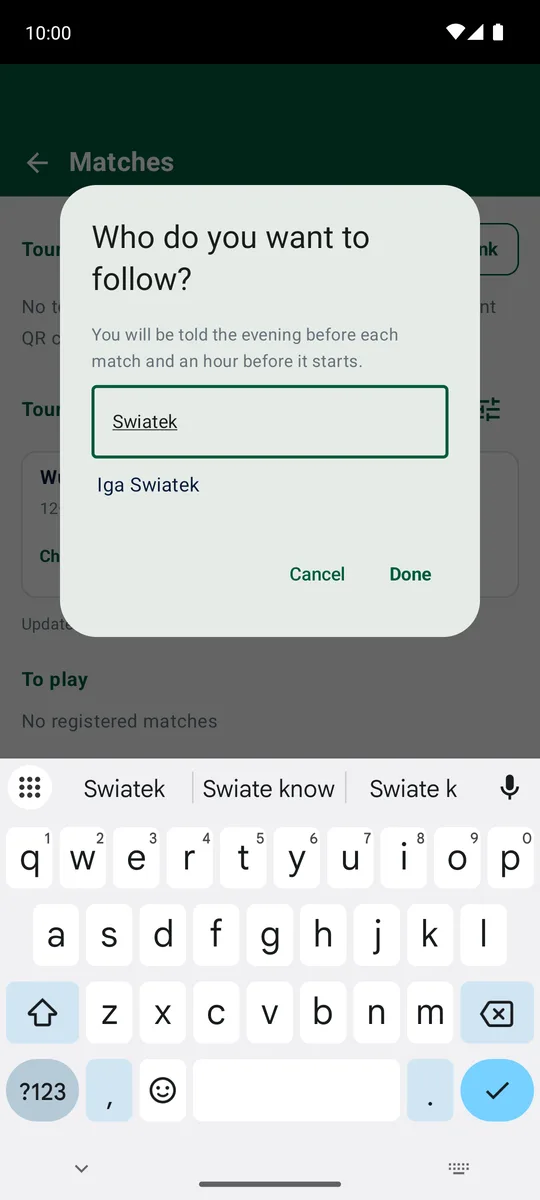
The TennisScore app: the “Who do you want to follow?” window with the player search by name
In the app: “Choose a player”, then type the name.

.ics file, Google Calendar or the app: the differences

The tournament bell opens a round menu with three choices: “.ics file”, which downloads a file for your calendar, “Google Calendar” and “Phone”, that is the TennisScore app. The first two put an event in your calendar; the app reminds you with its own notifications.

.ics file

“.ics file” in the bell menu

What it is

A standard file with the event and its reminder, prepared by your browser: it doesn't go through our site.

Where it works

In the Calendar on iPhone, iPad and Mac, in Outlook, in Samsung Calendar and in almost every calendar app. On Android, if your app doesn't open it, choose Google Calendar in the menu.

The reminder

Ours: the evening before at 7 pm for a tournament, one hour before for a match.

If the time changesDoesn't update

It's a copy: if the time changes, you have to add it again.

Google Calendar

“Google Calendar” in the bell menu

What it is

A link that opens Google Calendar with the event already filled in: you check it and tap “Save”.

Where it works

On Android, on a computer and wherever you use your Google account.

The reminder

Your Google Calendar's default one: the link can't bring its own.

If the time changesDoesn't update

Here too it's a copy.

TennisScore app

“Phone” in the menu, or the bell next to a player

What it is

The app's notifications on your phone: the start of the tournament and, only here, the matches of the player you choose.

Where it works

On Android phones, with the TennisScore app from version 1.3. Reminders arrive even with the app closed.

The reminder

For the tournament, the evening before at 7 pm; for the player, the evening before and one hour before each match. You choose the timing in the app.

If the time changesUpdates by itself

Several times a day, and shortly before each reminder, it reads the order of play from our site and moves its reminders.

Every tournament of a circuit? At the bottom of the tournament calendar you'll find the “Calendars to subscribe to” (ATP, WTA, Premier Padel): you subscribe once and the tournament dates update by themselves. On iPhone, iPad and Mac they're added with one tap; Google Calendar adds them from a computer, with “From URL”, and updates them on its own schedule.

Open the tournament calendar →

After the match

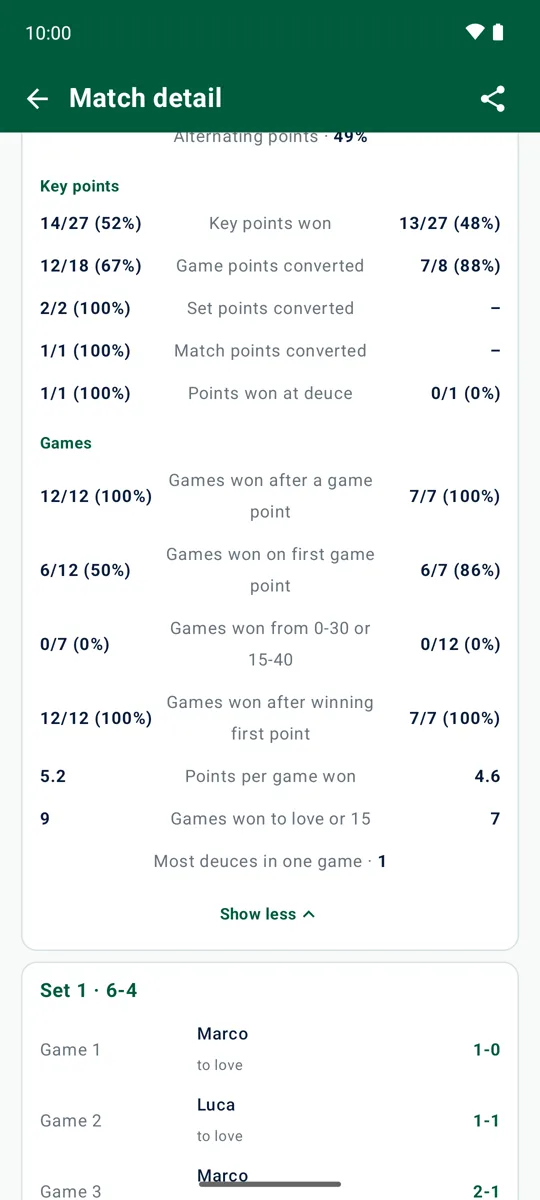
Every match kept with its tennis statistics

Points won, service and return points, breaks, games to love, longest streak. Then the advanced ones: game, set and match points converted, key points, comebacks from 0-30 or 15-40, games closed on the first chance, best run. And the point-by-point log, to review any moment and settle disputes.

  • Start, end and duration of the match, of every set and every game
  • Share the whole match as an album of images or as a PDF, statistics and photos included
  • Up to three memory photos per completed match
Tennis match detail with statistics Point-by-point log of a tennis match

How it works

On court or from afar, the match always stays with you.

1

Create or find the match

Start your match or tap “Follow” and enter the code of the match you want to follow.

2

Update the score

From the phone, from the Wear OS watch or by whoever keeps score at the courtside.

3

Follow live, or let the alerts tell you

Whoever subscribed watches the match in real time or turns on the alerts: a notification at every game, even with the app closed.

4

Keep the moment

Close the match, add a photo and find it again in the history with its statistics.

Experience

A sporty, modern, readable interface.

The site echoes the app as it really is: big buttons, court colours, the score at the centre.

TennisScore tennis scoreboard on an Android phone: sets, games, points and the point buttons

Example match

Match duration1:18:42
Games played18
Total points126
SportTennis

Example numbers: yours are in the detail of every match.

For everyone

It doesn't matter how you play. It matters that it's your match.

TennisScore is made for different people, without taking age, level or playing context for granted.

Young playersFirst matches and practice
AdultsSport, hobby and competition
SeniorsSimple, readable play
FamiliesFollow the ones you love from afar
FriendsShared matches and challenges
An interface that doesn't belong to a single kind of player.Neutral, readable, sporty graphics; simple language; usable from the court, from home, from the watch or, in the future, from an external control.

Memories

The result passes. The memory stays.

The match doesn't end with the last point: result, photos and history are part of the same experience.

Match over6-4 4-6 10-7
Add a photo

End-of-match photo

Not just the score

Build a story of your matches.

Remember your players with their photos, save the result, add up to three memory photos, find your previous matches and keep the moments worth remembering.

End-of-match photosPlayers with photosMatch historyHand-off to a partnerStatistics

Questions

Frequently asked questions

Is TennisScore free?

Yes. TennisScore is free, with no ads, no in-app purchases and no sign-up. You install it from Google Play and start scoring.

Which phones and tablets does it work on?

Any Android phone or tablet with Android 11 or later. The screen adapts to small phones and to tablets.

Which watches does it work on?

Wear OS watches with Wear OS 3 or later (for example Galaxy Watch4 and newer, Pixel Watch), paired with your phone. The watch app is installed from Google Play on the watch; the phone app must be installed too, because the match lives on the phone.

Does it work without an internet connection?

Scoring, statistics, photos and the watch work offline. Only the live score for spectators needs a connection: if it drops, the app keeps scoring and syncs as soon as the network is back.

How do spectators follow the match live?

Every match has a code. Spectators install TennisScore, tap "Follow" and enter the code: they see the score in real time on their own phone. They can subscribe before the match starts.

Do I have to keep the app open to follow a match?

No. In the match you follow, tap the bell: from then on you get a notification at the end of every game, with the names and the score, and at the end of the match the winner with the result. You can close the app and use your phone for something else; to stop, tap the bell again.

Are heart rate and steps sent anywhere?

No. Heart rate and steps are read by the watch only during a match, only if you turn the sensors on, and travel only from your watch to your phone. They are never sent to the app's servers, to spectators or to another phone, and they are deleted with the match. They are sport statistics, not medical advice.

Where are the memory photos stored?

Only on your phone, in the app's private storage: never in the cloud and not even in the Android backup. They leave the phone only when you share the match pages or hand the match to a partner with the direct transfer.

Can I save my players and their photos?

Yes. The phone remembers who has played: at a new match you pick the players from the list, most recent first, or type a new name. Each player can have a photo, shown on the scoreboard, in the summary, in the match detail and in the pages you share. The list and the photos stay on your phone: people following the match live see the names, not the photos.

Can I give a match to a friend's phone?

Yes, with the direct transfer: both phones need TennisScore and Android 13 or later. The match, photos included, goes from one phone to the other over Bluetooth or the local Wi-Fi network, after you both confirm the same code on screen. It does not go through any server.

What if I score a point by mistake?

Undo the last point with one tap. From the lock you can also correct the score of the game, the sets and the server. All the points of a match stay recorded, so the statistics and the point log stay right.

Does it work for padel too?

Yes. In a new match choose Padel: it starts as doubles, with the four names, and with the golden point at deuce already on, which you can turn off if you play advantages. Scoring is the same as tennis: 15, 30, 40, games, sets and tie-breaks, with the same live score, statistics, watch and photos.


Guides

Scoring rules and small tricks, explained properly

How points are counted, the tie-break, the golden point in padel, the three-number call in pickleball, how to follow a match from afar: short guides, read in three minutes.

Tennis club tournament rules: a templateA sample rulebook for your tennis club tournament: entries, format, matches, standings, postponements, results and withdrawals. Copy and adapt it. Round robin or knockout tournament: how to organize itRound robin, knockout or groups with a final stage: how many matches, how many rounds and which format to choose for your tennis or padel tournament. Padel Americano tournament: rules and rounds for 8 playersThe padel Americano: partners that change every round, individual points, ready-made rounds for 4, 8 and 12 players, and the Mexicano variant. Pickleball Scoring: the Call, the Side Out, Games to 11In pickleball only the serving side scores, the score is called with three numbers and a game goes to 11, win by two. Side out, serving side, rally scoring and changes of ends, explained clearly. Keeping the Pickleball Score with the App and the SmartwatchHow to keep the score of a pickleball match with TennisScore: the format, the two "Rally" buttons, the spoken call, corrections from the lock, game point from the wrist, the live score for friends. Tennis, Padel and Pickleball: Three Ways to Count PointsTennis and padel count the same way, pickleball does not. Points, games, sets, who can score, serving and changes of ends in the three sports, side by side, and what changes in the app. Players and photos: the app remembers who you play withTennisScore remembers your players: pick them from the list at every new match, each with a photo. How it works and where the data stays. Star Point in padel: how the 2026 rule worksThe Star Point is padel's new deuce rule: two advantages, then one deciding point. How it works, where it applies from 2026 and what changes. Follow a match with notifications, with the app closedCan't keep watching? With the bell on, TennisScore sends an alert at every game and the final result: how to turn it on and what you receive. How tennis scoring works: 15, 30, 40, games and setsLove, 15, 30, 40, advantage: tennis scoring explained simply, with games, sets, the tie-break, the super tie-break and no-ad scoring. Padel scoring explained: games, sets and the golden pointPadel is scored like tennis: 15, 30, 40, games, sets and tie-break. The golden point at deuce, the underarm serve, changes of ends and amateur formats. Tennis scoring from your smartwatch: TennisScore on Wear OSKeep score in tennis and padel from the wrist with a Wear OS, Galaxy or Pixel watch: install, tap, undo, heart rate and steps, phone in your pocket. Tiebreak rules in tennis: scoring, serve, super tiebreakWhen a tiebreak is played, how the points are counted, who serves, when you change ends, and how the 10-point super tiebreak works. Follow a tennis match live from home: the match codeHow someone who stays home follows an amateur tennis or padel match live: the match code, subscribing, end-of-game notifications and the final result.

All guides →

Tennis Padel Score

Take every match beyond the court.

One place to play, update the score, follow the people you care about and keep the memory of the match.

Get it on Google Play

Free, with no ads and no sign-up: no personal data required. For phones and tablets with Android 11 or later, and for Wear OS watches.

Google Play and the Google Play logo are trademarks of Google LLC.